- Home
- Expansion units
- DX517
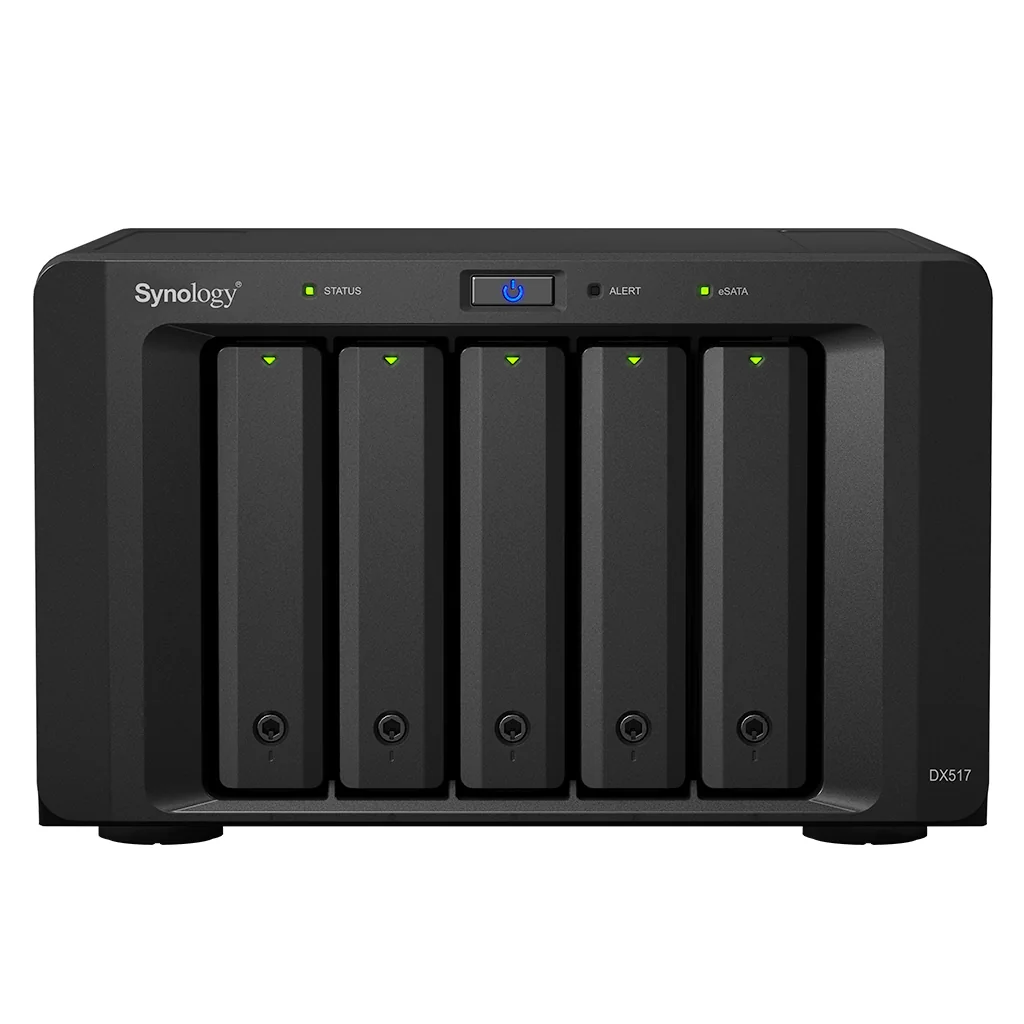
DX expansion · DX517
Synology DX517 5-bay expansion unit
Effortless capacity expansion for Synology DiskStation solutions on-the-fly.
$1,021.00inc. GST
In stock, 23 available
- Australian stock, GST tax invoice
- Genuine Synology, full local warranty
- Dispatched in 1 business day when in stock
- Ask a question about this model
- Bays
- 5
5-bay 3.5"/2.5" SATA expansion
Easily add 5 additional drive bays to Synology DiskStation . Supporting both 2.5" and 3.5" SATA drives, DX517 is a flexible solution supporting on-the-fly volume expansion or serving as a local backup destination.
Online volume expansion
Managed from DiskStation Manager on the host NAS, the additional bays in the DX517 are immediately ready to be used once connected. On-the-fly volume expansion ensures that storage and services on the host are not interrupted during volume expansion.
Hot-swappable drive tray design
The hot-swappable drive trays of DX517 allow easy drive installation and replacement without powering down the system. Screwless drive tray design reduces the time needed for system setup.
Dedicated local backup solution
Synology DX517 can be used as a dedicated local backup solution for the Synology DiskStation. When created as a separate volume, the DX517 provides a great backup solution to its local hard disks in case of system failure.
About the DX517
Synology DX517 offers simple storage capacity expansion solution for your DiskStation through its intuitive plug-n-use design. DX517 allows you to instantly scale up to 5 additional hard drives, so that you can expand RAID volume online or deploy the drives as a dedicated local backup destination for your Diskstation. Models compatible - DS1819+, DS1618+, DS1019+ DS918+, DS218+, NVR1218 , DS420+,DS920+, DS720+, DS923+
Key points
- Online Volume Expansion
- Dedicated Local Backup Solution
- Reliable Plug-n-use Design
- Hot-swappable HDD Design
- Adopts Marvell 88SM9705
- 3-year hardware warranty, extendable to 5-year coverage - EW201
Specifications
As published by Synology for the DX517. Confirm the latest data sheet before relying on a figure for a tender.
| Applied Models | |
|---|---|
| Supports creating volumes across different units | 23 series: DS1823xs+, DS923+, DS723+ 22 series: DS1522+ 21 series: DS1821+, DS1621xs+, DS1621+, DVA3221 20 series: DS1520+, DS920+, DS720+ 19 series: DS1819+, DS1019+, DVA3219 18 series: DS1618+, DS918+, DS718+, NVR1218 17 series: DS1817+, DS1817, DS1517+, DS1517 16 series: DS916+, DS716+II, DS716+ 15 series: DS1815+, DS1515+, DS1515 |
| Supports creating volumes on a single unit only | 18 series: DS218+ 16 series: DS216+II, DS216+, NVR216 15 series: DS415+ |
| Storage | |
| Drive Bays | 5 |
| Drive Type | 3.5" SATA HDD 2.5" SATA HDD 2.5" SATA SSD |
| External Ports | |
| eSATA Port | 1 |
| Appearance | |
| Size (Height × Width × Depth) | 157 mm x 248 mm x 233 mm |
| Weight | 3.91 kg |
| Power | |
| Power Recovery | Synchronized with the Synology DiskStation |
| Power Supply Unit / Adapter | 200 W |
| AC Input Power Voltage | 100V to 240V AC |
| Power Frequency | 50/60 Hz, Single Phase |
| Power Consumption | 29.9 W (Access) 2.4 W (HDD Hibernation) |
| British Thermal Unit | 102.02 BTU/hr (Access) 8.19 BTU/hr (HDD Hibernation) |
| Temperature | |
| Operating Temperature | 5°C to 40°C (40°F to 104°F) |
| Storage Temperature | -10°C to 70°C (15°F to 155°F) |
| Operating Humidity | 8% to 80% RH |
| Storage Humidity | 5% to 95% RH |
| Others | |
| System Fan | 80 mm x 80 mm x 2 pcs |
| Noise Level | 21.5 dB(A) |
| Warranty | |
Shipping
In-stock items leave our Australian warehouse within one business day. Order-in items usually arrive in 3 to 7 business days from the distributor. Shipping is calculated at checkout from the weight of your order (this item: 10.5 kg).
Shipping detailsWarranty
Genuine Australian stock with Synology's manufacturer warranty, serviced locally. Warranty terms are on the Synology data sheet for this model.
Returns and warrantyNeed a hand?
We will confirm compatibility with your existing NAS, recommend drives and memory, or quote a configured unit for a business site.
Ask belowAsk about the DX517
Compatibility, lead times, a quote for several units: a person replies, usually the same business day.
Goes well with

 Popular